
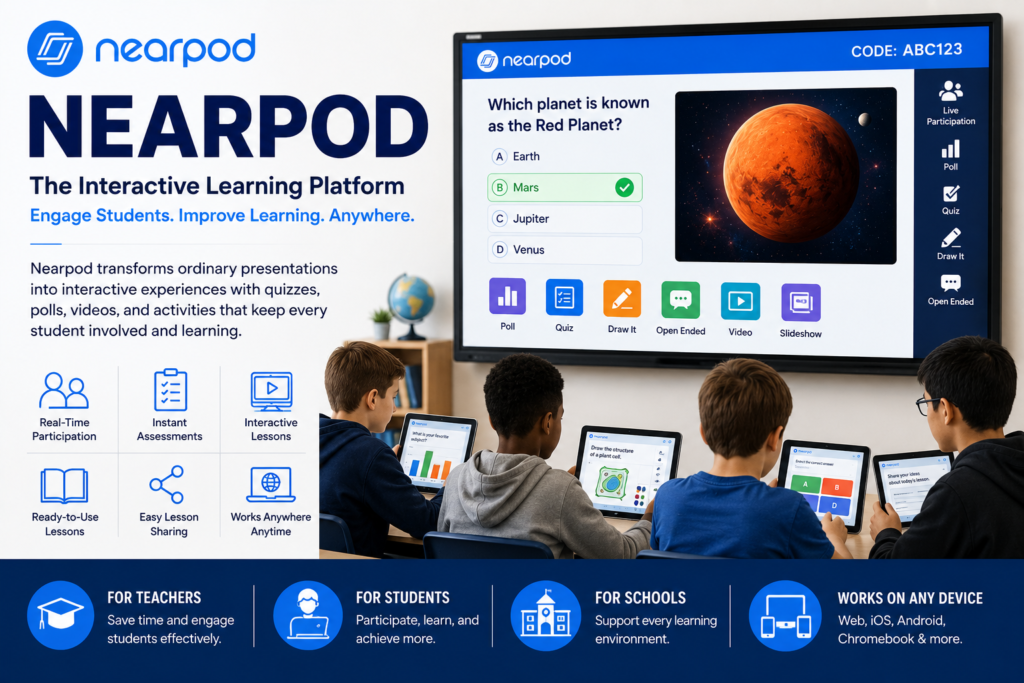
Since then, I’ve spent time exploring its features, testing different lesson formats, and seeing how it can transform ordinary presentations into interactive learning experiences. If you’ve been wondering whether Nearpod is worth trying, this guide shares everything I’ve learned along the way.
What Is Nearpod?
Nearpod is an interactive learning platform that helps teachers create engaging lessons for both in-person and online classrooms. Instead of giving students a traditional slideshow, it allows them to participate throughout the lesson with quizzes, polls, videos, drawing activities, matching games, and more.
One thing I appreciated right away was how simple everything felt. I didn’t need hours to understand the dashboard. After creating my first lesson, I realized that most of the tools were designed to save teachers time rather than add more work.
Whether you’re teaching elementary students, high school classes, or even professional training sessions, Nearpod offers plenty of ways to keep learners involved.
Why Nearpod Has Become So Popular
Technology has changed education dramatically over the past few years. Students now expect lessons to be more interactive than ever.
Nearpod fits perfectly into this shift because it combines presentations, assessments, and collaboration into one platform.
Some of the biggest reasons people choose Nearpod include:
- Interactive presentations
- Real-time student participation
- Instant assessment results
- Easy lesson sharing
- Works for remote, hybrid, and classroom learning
- Integration with popular learning management systems
I noticed that even simple lessons became much more interesting once interactive activities were added.
My First Experience with Nearpod
When I first explored Nearpod, I expected a complicated setup process.
Instead, I was surprised by how quickly I could create a lesson. The platform walks you through each step, making it beginner-friendly.
I started by importing an existing PowerPoint presentation.
Then I added:
- A quick quiz
- A live poll
- A collaborative discussion board
- A short educational video
The difference was incredible. Instead of passively reading slides, participants interacted with the content every few minutes.
That alone made the lesson feel more engaging.
Key Features That Stand Out
Interactive Lessons
This is the feature that impressed me the most.
Nearpod lets you turn ordinary presentations into interactive experiences where everyone participates throughout the lesson.
Students don’t simply watch.
They answer questions, complete activities, and stay focused from beginning to end.
Built-In Assessments
Assessment becomes much easier because quizzes are built directly into the lesson.
You can add:
- Multiple-choice questions
- Open-ended responses
- Draw-it activities
- Matching exercises
- Polls
- Time-to-Climb games
The instant feedback helps identify topics students understand and areas that need more explanation.
Ready-to-Use Lesson Library
One feature I didn’t expect to use so often was the lesson library.
Instead of building everything from scratch, teachers can browse thousands of pre-made lessons covering different grade levels and subjects.
This can save hours of preparation.
Student Engagement Tools
Nearpod includes several activities that encourage participation.
Some favorites include:
- Live quizzes
- Collaborative boards
- Interactive videos
- Drawing activities
- Virtual field trips
- Polls and surveys
These features help break up long lessons and keep students involved.
Benefits I Noticed While Using Nearpod
After spending time exploring the platform, several advantages stood out.
Easy to Learn
The interface is clean and organized.
Even if you’re not particularly comfortable with educational technology, it doesn’t take long to get started.
Better Student Participation
One thing I noticed was that quieter students often participated more through digital activities than they did during traditional classroom discussions.
That surprised me.
Sometimes answering anonymously through a poll makes students feel more comfortable sharing their thoughts.
Flexible Teaching Options
Nearpod works in multiple teaching environments.
It supports:
- Traditional classrooms
- Online learning
- Hybrid education
- Self-paced lessons
- Group instruction
That flexibility makes it useful for many different teaching styles.
Personal Tip #1
One mistake I made early on was adding too many activities into a single lesson.
Students enjoyed the interaction, but switching activities every minute became distracting.
Now I try to space interactive elements naturally throughout the lesson instead of adding them to every slide.
The experience feels much smoother.
Personal Tip #2
I also learned that short videos work better than long ones.
Instead of showing a ten-minute educational video, I prefer using a two or three-minute clip followed by a quick quiz or discussion.
Students stay focused, and it creates better conversations afterward.
That simple adjustment made a noticeable difference.
Nearpod for Different Subjects
One thing I really like is that Nearpod isn’t limited to one type of classroom.
It works well for many subjects.
Mathematics
Teachers can include practice problems, drawing activities, and quick assessments that reveal how students solve questions.
Science
Interactive diagrams, simulations, videos, and virtual field trips make science lessons much more engaging.
English Language Arts
Reading comprehension quizzes, vocabulary practice, and collaborative discussions fit naturally into language lessons.
Social Studies
Historical maps, timelines, videos, and virtual museum tours help students visualize important events.
Related Keywords You Should Know
While learning about Nearpod, you’ll probably come across several related educational technology terms, including:
- Interactive learning platform
- Digital classroom tools
- Student engagement
- Online teaching software
- Virtual classroom activities
Understanding these concepts helps explain why platforms like Nearpod have become increasingly popular.
Is Nearpod Easy for Beginners?
In my opinion, yes.
Many educational platforms feel overwhelming at first.
Nearpod doesn’t.
Most features are clearly labeled, and creating a basic lesson takes only a short amount of time.
If you already know how to use presentation software, you’ll likely feel comfortable with Nearpod quite quickly.
Things to Consider
No platform is perfect.
Here are a few things worth keeping in mind.
- Some advanced features require paid plans.
- Building highly interactive lessons still takes planning.
- Reliable internet access improves the overall experience.
- Teachers may need time to explore all available tools.
Even with those considerations, I found the overall experience very positive.
Who Should Use Nearpod?
Nearpod can benefit many different users, including:
- Classroom teachers
- School administrators
- Tutors
- Homeschool educators
- Corporate trainers
- Educational organizations
Its flexibility allows people in different teaching environments to create engaging learning experiences.
My Overall Thoughts
After spending time exploring Nearpod, I understand why so many educators recommend it.
It transforms ordinary presentations into interactive lessons without making the process overly complicated.
More importantly, it encourages participation instead of passive learning.
For me, the biggest benefit wasn’t the technology itself.
It was seeing how interactive activities naturally kept learners involved throughout an entire lesson.
That makes teaching more enjoyable for instructors and learning more memorable for students.
Final Summary
Nearpod has become one of the most useful interactive learning platforms available today. It combines presentations, assessments, videos, quizzes, collaboration tools, and student engagement features into one easy-to-use system.
From my own experience, I found it simple to learn, flexible enough for different teaching styles, and effective at keeping learners actively involved. Whether you’re teaching in a classroom, online, or through a hybrid model, Nearpod offers practical tools that make lessons more interactive without adding unnecessary complexity.
If you’re looking for a better way to engage students and make learning more enjoyable, Nearpod is definitely worth exploring. Have you tried Nearpod before, or are you thinking about using it? Share your thoughts and experiences in the comments. I’d love to hear how it has worked for you.